All lessons
How to Access Editor Mode
How to switch your role to Content Editor to safely make simple website updates.
Edit Mode is used for making simple content updates without changing the site’s design or layout. It is intended for routine tasks like updating text, replacing images, editing links, and managing CMS content.
How to Access Edit Mode
- Log in to Webflow
Go towebflow.com/loginand sign in to your account. - Open Your Site
From your Dashboard, click on your site to open the Designer. - Open the Menu
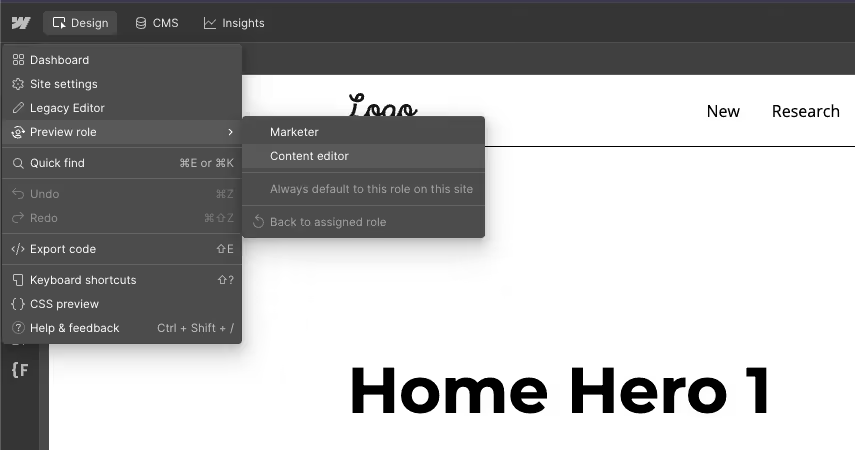
In the top-left corner of the Designer, click the Webflow icon to show the menu. - Switch to Edit Mode
Select Preview Role → Content editor. - Begin Editing
The interface will switch into Edit Mode, where you can safely make content-only updates.
What You Can Do in Edit Mode
- Edit text and images
- Update links
- Manage CMS items
- Update SEO fields
- Publish content changes
What You Cannot Do in Edit Mode
- Change layouts or styles
- Add custom sections or components
- Modify classes or design settings
- Access advanced Designer tools
Edit Mode is the safest option for routine website updates.
Previous lesson:
Next lesson: